Eiliko is a tiny wearable interactive pet charm from Energize Lab, with expressive faces, touch reactions and online AI chat. You can carry it on a bag, change its themed body and let it meet another Eiliko.
These Eiliko instructions cover first-time setup, the app, Wi-Fi, Couple ID pairing, outfits and common problems. Start with the quick look below, then follow the setup steps; connecting to your phone and permanently pairing two Eilikos are different things.
Affiliate disclosure: This guide contains Energize Lab affiliate links. If you buy through them, IPG may earn a commission at no extra cost to you.
Jump to: Setup · App and Wi-Fi · Couple ID pairing · Troubleshooting
What Is Eiliko?
Eiliko is a rechargeable electronic companion rather than a plush animal. Its screen shows animated expressions, while touch and movement produce reactions. Connected AI conversations add another kind of interaction; you do not need to treat every response as a feeding or care task.
Themed bodies let you change its appearance and unlock different animations and personality styles. Two Eilikos can also greet each other through infrared. Energize Lab sells both Eilik and Eiliko, so choose Eiliko-specific instructions when looking for help.
If you are comparing different play styles, our interactive pet toy guide is a useful starting point. For another wearable companion, see our Peekimo instructions; its controls should not be applied to Eiliko.
Eiliko Quick Start: Your First Setup
Have your Eiliko, its USB-C cable, a suitable USB power source, a phone and a 2.4 GHz Wi-Fi network ready. Keep the official English Eiliko manual handy for the illustrated button locations.
- Charge first. The manual specifies USB-C input at 5V, 600mA and recommends a full charge before first use. Its approximate empty-to-full charging time is 40 minutes. Watch for the charging and full-battery icons rather than relying only on elapsed time.
- Turn it on. Hold the top power button for four seconds. The top also has a touch sensor, so a light pat and a button press are different inputs.
- Prepare the app. Follow the manual’s QR code to the EnergizeLab app, register or sign in, and enable your phone’s Bluetooth.
- Add your device. In the app, choose Add Device, allow the nearby-device search, and select your Eiliko’s device number.
- Set up the network. Select a 2.4 GHz Wi-Fi connection, enter its password and finish the app’s setup prompts. The manual says 5 GHz Wi-Fi is not supported.
Start by gently petting its head or pressing once to change its expression. There is no need to enter Couple ID mode during ordinary first-time setup. The manual also describes automatic power-off after five minutes of inactivity, so a quiet screen does not necessarily mean something has failed.
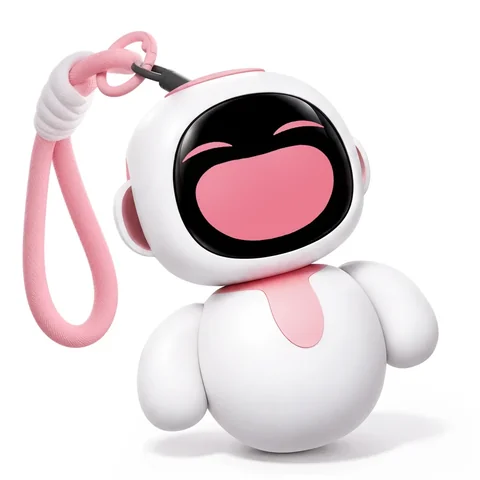
Expressive faces, little reactions and a companion you can take along. Explore Eiliko and choose the version that suits you.
Meet Eiliko at Energize Lab Energize Lab affiliate link.Does Eiliko Need the App, Bluetooth and Wi-Fi?
Use the app and phone Bluetooth for network setup; use Wi-Fi with internet access for AI chat. Energize Lab’s connectivity FAQ also allows a mobile hotspot during setup. Check that the hotspot provides a compatible 2.4 GHz connection.
| What you want to do | Connection involved |
|---|---|
| Configure Eiliko’s network | EnergizeLab app, phone Bluetooth and Wi-Fi or a compatible hotspot. |
| Have an AI conversation | An internet-connected Wi-Fi connection. |
| Use built-in offline commands | No online AI conversation required; use the supported command list. |
| Let two Eilikos greet each other | Face-to-face infrared interaction, separate from phone setup. |
How do I start AI chat or return to offline play?
After network setup, hold the power button for three seconds while Eiliko is on to start connecting for online chat. In chat mode, the manual uses the wake phrase “Hi Eilik”—without the final “o”—or lets you hold the button while speaking and release it when finished. Two short presses exit online chat.
Offline play uses a fixed command library, not unrestricted conversation. The manual includes commands such as “Give me five” and “Make a face.” Use its offline list when disconnected; an unsupported request is not evidence that the microphone is broken.
What Does the Energize Lab App Do?
The app handles the first network configuration and settings such as volume and screen brightness, according to Energize Lab’s app FAQ. It is the place to check these settings before assuming a quiet voice or dim display is a hardware fault.
Keep both the app and Eiliko updated. The manufacturer’s RFV3.3 update notes describe additional language support and battery-display options, including app settings for when the battery indicator appears. Older screenshots and launch videos may show fewer options.
Security researchers reported vulnerabilities affecting Energize Lab's connected robot services in October 2026, so owners should review the latest security updates and avoid sharing sensitive information through AI chat.
How Does Eiliko Couple ID Pairing Work?
Couple ID pairs two Eilikos with each other, not an Eiliko with its owner’s phone. Energize Lab describes this as an optional, permanent bond that unlocks couple interactions. Its Lover Set information explicitly says each Eiliko can pair only once and the pairing cannot be reset.
Choose the intended partner before continuing, particularly if either device is second-hand or you are setting up a gift. Ordinary infrared greetings are available separately; do not confirm a lifetime bond just to test whether two units can interact.
- Power on both Eilikos and check that neither has previously completed Couple ID pairing.
- On each unit, press the power button briefly four times to enter Couple ID pairing mode.
- Read the confirmation prompt. To leave this mode without confirming, use two short presses.
- If both owners intend to proceed, press four times again on each Eiliko to confirm.
- Place the two units face-to-face so they can record each other’s ID and complete the pairing.
A troubleshooting reset is not an unpairing tool. The manual’s reset procedure forces power-off without deleting stored settings. Do not buy a previously paired unit expecting a reboot, new phone or app reinstall to remove its Couple ID bond.
Outfits, Themed Bodies and SpinKits
A themed body is the removable lower part of Eiliko, rather than just a fabric costume. Energize Lab’s Eiliko information says different bodies bring their own personality and animations. Think of them as alternate character styles, not a promise that every accessory adds a completely new set of AI abilities.
How do I change Eiliko’s outfit?
Follow the manual’s body-recognition diagram: gently rotate the body left and pull down to remove it, then insert the replacement upward and rotate right into place. Eiliko detects the body’s identity chip. Avoid forcing the connection if it does not seat naturally.
With a themed body attached, a single tap triggers its theme animation; two short button presses switch between theme and regular animation. A tap on the sensor and a press of the button are different actions, so check which input you are using.
What are Eiliko SpinKits?
SpinKits are Energize Lab’s themed-body accessories. For example, the Holiday Special SpinKit collection has distinct character looks and themed expressions. Check the exact contents: a themed body is not automatically another complete Eiliko, and a mystery-box option does not promise a particular outfit.

From everyday charm to themed companion, explore Eiliko and its compatible bodies. Check each set’s contents before choosing your next look.
Meet Eiliko at Energize Lab Energize Lab affiliate link.Common Eiliko Problems and Fixes
Work through the symptom that matches your device. These are manufacturer-based checks; Eilik desktop-robot reset and update instructions are not interchangeable with Eiliko’s.
Eiliko won’t power on
First charge it to check for a completely drained battery. If no charging status appears, the manual suggests trying another USB-C cable. Then try the normal four-second power-on press. Energize Lab’s power-on help recommends a reset if charging does not resolve the problem, followed by another power-on attempt.
Eiliko freezes or stops responding
Check whether an unfinished operation is waiting for input, then try a short press or touch. The official freezing guide recommends resetting if those checks fail. The manual’s button method is to hold the power button for 20 seconds until the display turns off, then restart normally. This preserves settings and does not erase Couple ID pairing.
Eiliko’s update fails or stalls
An unstable connection may be responsible. Energize Lab’s update troubleshooting page advises configuring the network again using a mobile hotspot and retrying. Charge before updating, as the manual recommends. If the failure repeats, record what appears on screen for support rather than experimenting with unrelated firmware tools.
Two Eilikos won’t interact through infrared
Position them face-to-face within the manual’s 10 cm range, with no obstruction between them. Both should be in their regular state, not online chat or Couple ID pairing mode. Greetings can trigger every five to ten seconds, so allow a moment. The infrared help page also suggests testing with another Eiliko, if available, to narrow down the problem.
Couple ID pairing fails
Check both units’ pairing history first. Then distinguish entering pairing mode from confirming it: the pairing support page specifically calls for four short presses to confirm. If the bond still fails, use official support rather than repeatedly trying different partners.
Frequently Asked Questions
Does Eiliko need Wi-Fi for AI chat?
Yes. AI conversations need an internet-connected Wi-Fi connection. Phone Bluetooth helps configure the network; it does not replace that internet connection.
Does Eiliko work offline?
Yes, for supported touch reactions and built-in voice commands. Offline commands are limited to the documented library, so they do not provide the same open-ended conversation as online chat.
Can Eiliko pairing be reset?
No. Energize Lab describes Couple ID as a one-time bond between two Eilikos. Restarting a frozen unit is a separate operation and does not undo that bond.
Can I change Eiliko’s outfit?
Yes. Compatible themed bodies swap onto the head unit and can change its animations and personality style. Follow the twist-and-remove diagram rather than pulling forcefully.
Is Eiliko portable?
Yes. It is designed as a carry-along charm. Keep it dry, protect it from impacts and follow the manual’s charging guidance when taking it out.
Does Eiliko support languages other than English?
Yes. The official language FAQ updated September 24, 2026 lists English, Chinese, German, Korean, French, Japanese, Russian, Spanish, Arabic, Italian, Vietnamese, Portuguese, Malay, Thai and Indonesian. Update the app and device, and check current support information if your preferred language is missing.
Getting Comfortable With Your Eiliko
Start with charging, phone setup and simple reactions, then explore online chat and themed bodies. Leave Couple ID until you are sure about the permanent partner. For unresolved faults, visit Energize Lab support and select Eiliko; include the symptom, screen message and steps already tried.