Fuggler Puppetronics are electronic hand puppets: you operate the built-in controller to animate the mouth and eyelids, while electronics add noisy reactions. For the clearest sound trick, press the fart-and-burp button with the mouth closed for a fart, or open for a burp. They are designed for puppeteering rather than independent walking.
This guide covers setup, verified controls, five advertised play modes and two-puppet interaction. It separates manufacturer information from owner observations; we have not personally tested the toys.
Watch: Mr. Buttons Puppetronic in action
See Rad’s unboxing offers a closer look at Mr. Buttons. This is an independent creator’s demonstration, not an official instruction video.
Affiliate disclosure: As an Amazon Associate, I earn from qualifying purchases. This page includes two Amazon affiliate links.
Meet the Fuggler Puppetronics crew
A toothy grin, a cheeky burp and plenty of personality. Explore the Puppetronic listing and check the selected character before checkout.
See Fuggler Puppetronics on Amazon ↗
Amazon affiliate link · Opens on Sketchy Squirrel; check character options and seller terms.
Fuggler Puppetronics at a glance
| Feature | What to know |
|---|---|
| Play style | Hand-controlled electronic puppet with an embedded controller |
| Expressions | Moving mouth, blinking eyelids and electronic sound effects |
| Size | Approximately 14 inches tall |
| Power | Three AAA batteries; sold separately on checked retailer listings |
| Characters | Mr. Buttons, Rabid Rabbit, Sketchy Squirrel and Sickening Sloth |
| Shared play | Compatible Fuggler Puppetronics can interact with one another |
The manufacturer’s launch announcement confirms the four-character range and hand-controller format. Check the age label on your exact box: several retailers specify 8+, while the official Rabid Rabbit description says 6+.
How to set up your Fuggler Puppetronics
- Keep the paperwork. Unpack the puppet and its mystery underwear accessory. Retain the character’s instruction sheet before discarding packaging; it is the best reference for the physical control layout.
- Check the power requirements. WOW! Stuff’s Mr. Buttons page confirms three AAA batteries. Have an adult follow the compartment’s polarity markings and the supplied installation directions.
- Find the labelled battery access and power control. A complete official manual was not located during this research. We therefore cannot verify their precise location, fastener type or any shipping-tab procedure. Follow your own sheet rather than searching by pulling seams apart.
- Get comfortable with the controller. The manufacturer describes placing your hand inside to operate the puppet. Find a comfortable grip without forcing fingers into a tight space; exact finger positions remain undocumented in the sources checked.
- Start with one response. Try the mouth-position sound test below before exploring other controls. Practising one action makes it easier to distinguish movement from mode selection.
If instructions are missing, ask the retailer or WOW! Stuff for the sheet matching your character and model. Do not substitute another brand’s Puppetronic manual.
Fuggler Puppetronics controls explained
The embedded controller lets you perform the character. Public product descriptions establish the following actions, but do not provide a complete numbered button map.
| Control / action | What it does | How to use it |
|---|---|---|
| Mouth movement | Opens and closes the toothy mouth | Use the built-in hand controller; do not pull the jaw by hand. |
| Eyelid movement | Creates blinks and expressions | Operate the controller as shown on your sheet; exact trigger mapping is unverified. |
| Fart-and-burp button | Changes sound with mouth position | Closed mouth: fart. Open mouth: burp. |
| Mode selection | Changes the play behaviour | Five modes are advertised; a verified button sequence is unavailable. |
| Automatic reactions | Adds sounds during play | Owners report noises while powered on without a fresh button press. |
| Touch features | Early manufacturer information mentions touch sensors | Sensor locations and individual reactions are not documented in the checked sources. |
One Mr. Buttons owner found that some buttons seemed to select moods rather than immediately perform an action. That is a useful explanation for confusion, but an observation from one owner cannot establish the full control map for every puppet.
Understanding the five play modes
The official Rabid Rabbit product page advertises five play modes encompassing vocal effects and expressive play. It does not name all five or explain their selection order. We have not invented a five-item mode list or a press-and-hold shortcut.
Use the included mode guide to identify the current setting. Test one change at a time instead of pressing several controls together. A changed behaviour may indicate a different mode rather than a fault; without the sheet, record which control you used when asking support for help.
Why do listings say both 40+ and 60+?
WOW! Stuff’s early announcement described over 40 combined sounds and actions. Its later launch announcement describes over 60 combinations, while some product copy still uses the earlier figure. These are combined effects and actions, not a confirmed menu of 60 separately selectable recordings.
How to make your Fuggler burp and fart
The official Mr. Buttons description gives a clear mouth-position rule:
- With the puppet powered for play, close its mouth using the controller.
- Press the dedicated fart-and-burp button to request a fart effect.
- Open the mouth using the controller, then press that button for a burp.
If you get the unexpected effect, check the mouth position first. Do not assume that repeatedly pressing a mode control is the same as pressing the sound button. The decorative Fuggler button-hole detail is not identified as this operating control.
How two Fuggler Puppetronics talk to each other
You need two compatible Fuggler Puppetronics for the advertised back-and-forth interaction. The manufacturer describes conversational reactions and coordinated “Fugglish” noises; this means character sounds rather than a promise of ordinary spoken conversation or voice-assistant answers.
WOW! Stuff says that one puppet’s burp can trigger burps or farts from others. However, the checked documentation supplies no Bluetooth instructions, pairing code, exact distance or complete activation sequence. Use the included sheet for any interaction setting.
If nothing happens, first confirm that each puppet works individually and that both are powered for play. An owner describes sound-based interaction, but this is not a manufacturer specification. Do not treat an exact microphone location or wireless connection method as established.
Fuggler Puppetronics not working?
These are conservative checks, not a manufacturer repair procedure. Stop if a mechanism catches or feels unusually stiff; do not dismantle the head or force the eyelids.
| Problem | What to check |
|---|---|
| No sounds or response | Check the labelled power setting and battery installation against your sheet. Ask an adult to check three AAA batteries and polarity. |
| Weak or intermittent response | Low batteries are a possible cause, not a confirmed diagnosis. Follow the supplied replacement directions. |
| Mouth or eyelids do not move | Check your grip against the control diagram. Avoid pulling the face to compensate. |
| A button gives no immediate action | Check whether it selects a mode. Identify the dedicated sound control before repeating the test. |
| Unexpected noises | Owners report spontaneous vocal effects while switched on. Noise alone does not prove a fault. |
| Two puppets do not interact | Test each separately, then consult the interaction instructions. Do not attempt phone pairing. |
For persistent problems, send the retailer or manufacturer your model number, purchase details and a short description of the failed action. There is no verified factory-reset sequence in the sources checked. Kohl’s lists Mr. Buttons without automatic shut-off, so do not rely on silence to mean power is off.
Ready for some Fuggler mayhem?
Starting a puppet show or adding a noisy conversation partner? Find the character that fits your crew.
Amazon affiliate link · Opens on Sketchy Squirrel; check character options and seller terms.
All four Fuggler Puppetronics characters
The shared appeal is puppetry plus electronic reactions; the faces and styling differ. Manufacturer material identifies these four characters without establishing a separate control system for each:
- Mr. Buttons: bright pink fur and an oversized toothy grin.
- Rabid Rabbit: long rabbit ears and prominent buck teeth.
- Sketchy Squirrel: squirrel styling, shown in red and white in the supplied graphic.
- Sickening Sloth: brown-and-cream sloth styling with distinctive eye patches.
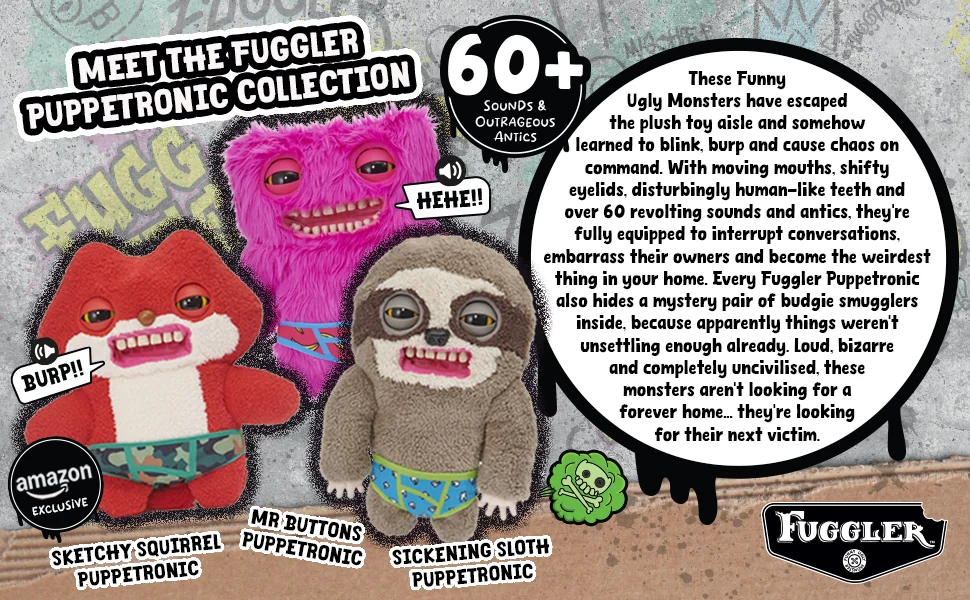
For a simpler sound-making plush, compare Fuggler Fart Face. For collectible formats, see Baddies and Baby Baddies or Fuggler Alley Cats. Those collections should not be assumed to share Puppetronics controls. Browse Other Interactive Pets for more operating guides.
If you prefer an electronic collectible without hand-operated puppet controls, our Lama Tama guide covers a pocket fortune teller that answers yes-or-no questions.
Frequently asked questions
How do you turn Fuggler Puppetronics on?
Use the power control identified by your own instruction sheet. Its exact physical location was not verified from a complete official manual.
What batteries do they need?
Three AAA batteries are confirmed for Mr. Buttons. Checked retail listings specify batteries are not included; check your exact pack.
How many modes are there?
Five are advertised. Their complete names and button-selection sequence remain unverified.
How do I get burps instead of farts?
Press the sound button with the mouth open for burps; close it for farts.
Can two puppets talk?
Yes, compatible Fuggler Puppetronics support the advertised Fugglish interaction. A phone or app is not part of the documented process.
Do they move by themselves?
Facial performance uses a hand controller. Automatic sound reactions do not make this an independently walking pet.
Are these Fart Face Fugglers?
No. Puppetronics are WOW! Stuff’s hand-controlled electronic puppets, a separate product from the Fart Face plush range.
Where can I find the official manual?
Keep the included sheet or request a replacement from WOW! Stuff or your retailer. The public product pages linked above confirm features but do not replace the complete operating manual.