Is your Mini Brands vinyl player not working, refusing to spin, or spinning without music? Before assuming it is defective, check the correct playback sequence. ZURU’s tiny player does not work quite like a full-size record deck: positioning the tonearm is only part of the process. You also need to gently press the headshell to start the sound.
This guide covers the ZURU Mini Brands Really Works Vinyl Playset Series 1 (model 77794). It does not cover MGA Miniverse Real Music, Tiny Vinyl, or a different miniature record player. Start with the steps below, then match your symptom to the troubleshooting table.
Mini Brands Vinyl Player: Quick Fix Checklist
Follow the ZURU instruction sheet in this order before trying another record:
- Place a compatible record flat on the turntable. Start with the included APT. record.
- Turn the power knob to ON. The record should begin spinning.
- Check that it spins freely. Keep loose hair and fingers away from the moving parts.
- Move the tonearm and headshell carefully over the spinning record.
- Gently press down on the headshell. This activates playback; simply moving the arm might not.
- Wait about three seconds. The manual describes a short period of static or noise before music begins.
Key distinction: A spinning record with no music can mean playback was not activated. A turntable that never spins may indicate a power or mechanical problem instead.
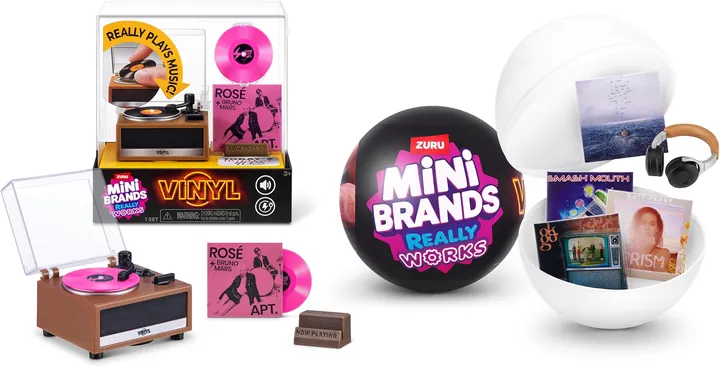
Mini Brands Vinyl Player at a Glance
| Full name | Mini Brands Really Works Vinyl Playset Series 1 |
|---|---|
| Manufacturer | ZURU |
| Model | 77794 |
| Compatible records | ZURU Mini Brands Really Works Vinyl Capsule records |
| Included record | “APT.” by ROSÉ and Bruno Mars |
| Power | Included rechargeable lithium battery |
| Music length | Approximately 30-second excerpts, according to ZURU’s retailer responses |
| Age guidance | 3+, with a small-parts choking warning |
| In the playset | Record player, one record, display stand |
Still Getting to Know Your Mini Player?
Check ZURU’s official product information to make sure you’re using the correct model and compatible miniature records.
View Official Mini Brands Vinyl PlayerWhy Is My Mini Brands Vinyl Player Not Working?
The fastest troubleshooting route is to identify what the player actually does. A record that spins but stays silent needs a different check from a turntable that never moves.
| Problem | First thing to check | Next step |
|---|---|---|
| Won’t turn on | Power knob position | Check charging and power |
| Record won’t spin | Power knob and unobstructed turntable | Check rotation |
| Spins but no sound | Press the headshell gently | Follow full playback sequence |
| Tonearm doesn’t start music | Headshell placement and press | Check tonearm operation |
| Buzzing or static | Does it clear after three seconds? | Compare expected noise |
| Music stops quickly | Has the 30-second excerpt ended? | Understand clip length |
| One record fails | Try included APT. record | Check compatibility |
| Won’t charge | Undamaged cable and documented setup | Charging checks |
| Works intermittently | Power and repeatable playback sequence | Know when to get support |
Mini Brands Vinyl Player Won’t Turn On
Start with the power knob. ZURU’s manual instructs you to turn the knob to ON, after which the record begins spinning. If you only moved the tonearm, you may not have switched on the player. Place the included record on the deck and try the documented sequence from the beginning.
If the turntable remains still, the rechargeable battery may need charging. Check the supplied instructions for the correct charging method, then inspect the cable and connection for obvious wear without opening the unit. Do not guess an LED colour meaning or assume a particular charge time—those details have not been reliably verified for this model.
Try again only after charging as instructed. If the knob remains unresponsive, or the unit shows damage, move to ZURU support instead of attempting internal repairs.
Mini Brands Vinyl Player Not Spinning
A player that powers on but does not rotate its record is different from one that spins normally but stays silent. Confirm the power setting first. Then look for obvious packaging material or a misplaced record that could obstruct rotation. Check without reaching into moving parts or forcing the platter.
Remove and reseat the included record gently as the manual shows, then try ON again. The device is designed to spin its miniature record; if the turntable still does not move, do not pry up the platter, twist the spindle with tools, or open its motor housing. Contact ZURU with the model number and a description of what happened.
Record Spins but No Music Plays
This is the most useful symptom to check before assuming the electronics have failed. The official Mini Brands vinyl player instructions call for two separate actions: carefully moving the tonearm over the record and gently pressing the headshell. Just lowering or positioning the tonearm may not start the music.
- Switch the player on and confirm that the record is spinning.
- Use the included APT. record so you know you are testing a compatible disc.
- Move the tonearm and headshell over the record carefully.
- Press the headshell gently as instructed; do not force it.
- Wait approximately three seconds for the initial noise to pass and the music to begin.
The brief static period is mentioned in the original manual, so it is not automatically a sign of a broken speaker. If you consistently hear no music after correctly following the steps, note whether the platter spins and whether any sound comes out at all. These observations help ZURU narrow down the problem.
Tonearm Won’t Stay Down or Playback Won’t Start
If the tonearm springs back or appears to hover, avoid trying to bend it into place. Follow the manual’s illustration for the tonearm and headshell positioning. The important documented playback action is a gentle press on the headshell, not physically holding the arm down with force.
Try that action carefully with the included record. Do not wedge an object against the arm or adjust the mechanism with pliers. If the same behaviour prevents playback every time, it may be a defective unit rather than an undocumented setting you have missed.
Mini Brands Vinyl Player Makes Buzzing or Static Sounds
ZURU’s instruction sheet says there can be about three seconds of static or noise before the music starts. If you hear that short burst and then the audio plays, the device is behaving in line with the documented startup sequence. You do not need to troubleshoot the brief delay on its own.
Continuous grinding, loud mechanical noise, or audio that remains severely distorted is different. Those symptoms are not confirmed as normal by the manual. Stop using the device if you suspect internal damage, rather than trying lubricants, compressed air, or opening the motor housing. If the issue repeats with the original record, report the details to ZURU.
Why Does the Music Stop After 30 Seconds?
The tiny discs are designed to play short music excerpts, not full albums or uninterrupted songs. ZURU’s customer responses at Target describe approximately 30-second clips. If the music plays and stops near that point, the short duration alone is not a malfunction.
That limitation is easy to miss when you see the miniature record player spinning. The record looks like vinyl, but this is a toy-format listening experience with a fixed short clip—not a conventional full-length turntable. If the sound cuts out immediately or inconsistently, check the separate power, tonearm and record sections above.
Why Do Some Mini Records Work but Others Don’t?
ZURU says this player works with its Mini Brands Really Works Vinyl Capsule records, sold separately. The player box includes the special APT. disc. That included record is your best first test when a separately purchased miniature disc does not play.
Do not assume that MGA Miniverse Real Music, Tiny Vinyl, or other small records use the same electronics or recognition system. Similar-looking miniature records are not automatically interchangeable, and the sources reviewed do not confirm cross-brand compatibility.
If APT. consistently works but another ZURU capsule record does not, confirm the second record belongs to the correct ZURU range, then note which disc fails. Do not attempt to modify the miniature record to make it fit another player.
Mini Brands Vinyl Player Charging and Battery Problems
The playset includes a rechargeable lithium battery. If the player does not respond, consult the included instructions for its charging connection and safe power setup. Make sure the cable is not visibly damaged and use only the charging arrangement recommended for this model.
We could not independently establish a reliable charging duration, charge-light colour chart, or battery-reset sequence. Avoid treating advice written for unrelated miniature record players as a verified fix. Do not open the rechargeable cell or try to replace it without manufacturer instructions.
Stop using or charging the toy if the battery appears swollen, the player becomes unusually hot, you notice damage, or charging repeatedly fails. A parent or adult should contact ZURU before trying anything further.
When Should You Contact ZURU?
If the player will not spin after the documented power steps, the headshell will not activate sound, the included APT. record repeatedly fails, or you notice heat, damage or charging problems, further home experimentation is unlikely to help. Use ZURU’s official support form instead.
Have model 77794, your purchase information, and a short description of the symptoms ready. Explain whether the platter spins, whether any noise plays, and whether the included record behaves differently from additional records. ZURU can advise on next steps; a particular refund or replacement outcome is not guaranteed.
Need a Little More Help?
If the player still won’t work after following the documented steps, ZURU’s support team is the next place to check.
Get Help from ZURUMini Brands Vinyl Player Frequently Asked Questions
Why is my Mini Brands vinyl player not working?
Start with the ON knob, the included record, and the documented tonearm-plus-headshell sequence. If it spins but stays silent, check the headshell press first.
How do I turn on my Mini Brands vinyl player?
Place the included record on the platter and rotate the power knob to ON. ZURU’s instructions say the record should start spinning.
Why does the record spin but no music play?
Position the tonearm over the record, gently press the headshell, and allow about three seconds for initial noise before audio begins.
Do you have to press the tonearm to play music?
The manual specifically says to press the headshell gently after positioning the tonearm. Do not force or bend the arm.
Why does my Mini Brands record player make static noises?
A brief three-second noise period before playback is documented. Persistent grinding or distortion is not established as normal.
Why does the music stop after 30 seconds?
The miniature records play approximately 30-second excerpts rather than whole songs. That is an expected product limitation.
How do I charge the Mini Brands vinyl player?
Follow the included rechargeable-battery charging instructions. Do not guess the charging time or light indicators from another model.
Can Miniverse records play on a Mini Brands record player?
Cross-brand compatibility with MGA Miniverse Real Music is not confirmed. Use ZURU Mini Brands Really Works records intended for this player.
Are all Mini Brands vinyl records compatible?
ZURU confirms compatibility with its Really Works Vinyl Capsule range. Other Mini Brands product ranges are not necessarily record formats.
What should I do if the turntable won’t spin?
Check the power knob and the included record. Never force the platter or open its motor. If it remains still, contact ZURU.
Where can I find official ZURU support?
Use the manufacturer’s customer contact page and provide model 77794 and your symptoms.
Sources and Verification
For setup, we followed ZURU’s FCC-hosted instruction sheet, with the readable manual transcription as a secondary reference. Product contents, model and compatibility are described on ZURU’s product page. The short-clip behaviour is described in ZURU’s responses on the Target product Q&A. Where the public sources do not confirm technical details, we have avoided claiming a particular reset, charging-light meaning or repair method.