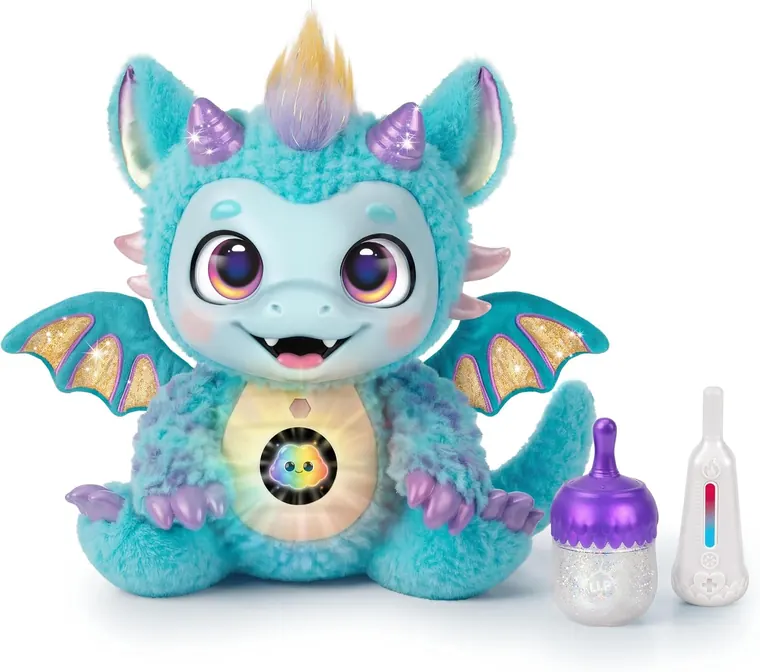
Little Live Pets My Magical Dragon Skye is an electronic plush dragon whose belly display shows what she needs. Feed her, comfort her, cuddle her, help her feel better and settle her to sleep to earn five digital gems. It is a care-and-response toy: the useful starting point is the picture on her belly, rather than trying every accessory at once.
This Little Live Pets dragon guide explains Skye’s features, first setup, care symbols and gem system, followed by a short troubleshooting checklist. It is researched from Moose Toys’ instructions and support answers, not a claim of hands-on testing.
Watch Moose Toys’ Official Skye Demonstration
Curious about Skye? Explore the current Amazon listing for the dragon, bottle and thermometer, then compare the selected offer.
🐉 Meet Skye on Amazon ↗Affiliate link. As an Amazon Associate I earn from qualifying purchases. Check the selected model, seller, contents and delivery before ordering.What Does the Little Live Pets Dragon Skye Do?
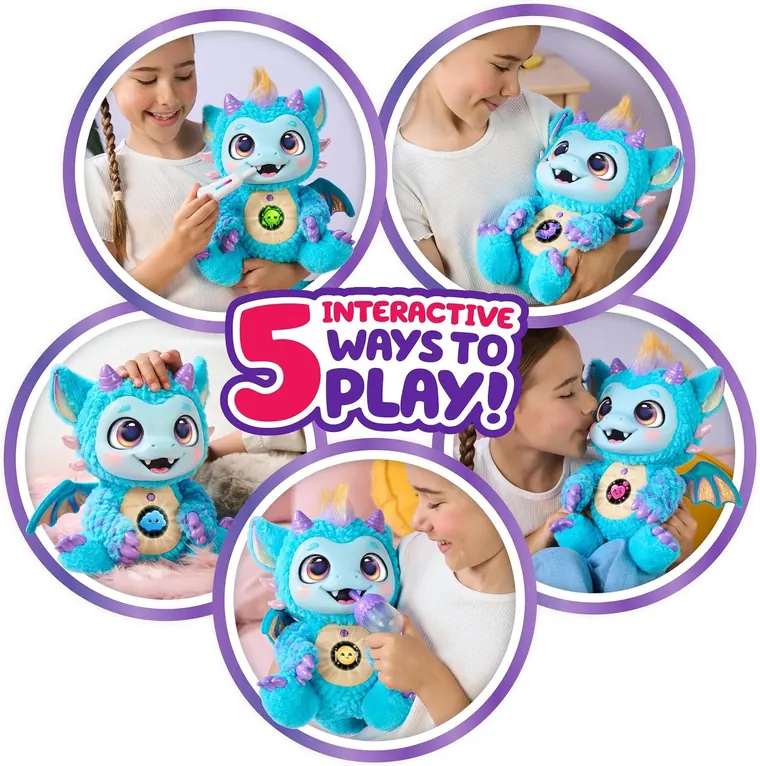
Moose Toys describes Skye as an interactive dragon with more than 60 sounds and reactions, a digital belly and five ways to care for her. The physical toy combines a plush body with a belly screen and care accessories.
The interaction is a small loop: notice a request, respond in the appropriate way, then watch the result. Success contributes to the gem collection. This makes the appeal different from a toy bought mainly for racing, competitive games or collecting a large character roster.
Moose names six states—happy, hungry, lonely, sleepy, sick and cuddly—but advertises five care activities. Happy is not a missing sixth task to complete. It is important to separate the toy’s displayed state from the five activities used to earn gems.
What Comes in the Box?
The manufacturer’s new-box list contains:
- One interactive Skye dragon.
- One feeding bottle accessory.
- One thermometer accessory.
- An instruction booklet and adoption certificate.
- Three AA batteries.
Keep the bottle and thermometer together. If the certificate seems missing, Moose’s FAQ says to look in the base of the cardboard packaging, where the instructions are also located. Check there before throwing the box away.
A used or open-box offer may be incomplete. Match the seller’s actual contents to this list instead of assuming every pictured accessory will be supplied.
First Setup: Get Out of Try-Me Mode
The official My Magical Dragon instruction sheet shows the switch and battery compartment on Skye’s back. Follow these checks before deciding that the toy is not working:

- Find the three-position switch. Its settings are Try-Me, Off and On.
- Move it to On. The manual says the toy is supplied in Try-Me mode; demonstration behavior does not represent the full care sequence.
- Check the belly picture. Use that request to choose an interaction from the chart below.
- Try one action at a time. Avoid patting a sensor while also pressing the mouth button and gem button.
Three AA 1.5V batteries power Skye. The manual describes the supplied cells as temporary Try-Me batteries and recommends fresh alkaline batteries for best results. An adult should handle replacement and follow the compartment’s polarity markings.
Progress note: moving the physical switch Off and back On clears the gem count according to the manual. Know that before using a power cycle simply to experiment.
Skye’s Belly Symbols: What Should You Do?
The following descriptions identify the five care pictures illustrated in Moose’s manual. Use the face and surrounding marks together; color alone is a weaker clue.
| Belly request | Picture to recognize | Care response |
|---|---|---|
| Hungry | Yellow/orange face | Use the feeding bottle at the mouth. |
| Sick | Green, unwell-looking face | Use the thermometer accessory at the mouth. |
| Cuddly | Pink face surrounded by hearts | Touch the head or back gently. |
| Lonely | Blue rain-cloud face | Pat the head or back for comfort. |
| Sleepy | Purple bedtime picture with a moon and sleep marks | Lay Skye down when she requests sleep. |
These are care prompts within an electronic toy. The bottle and thermometer are pretend-play accessories, not instructions to give Skye actual food, drink or medicine.
How to Care for Skye
Feed Her When She Is Hungry
Bring the bottle accessory to Skye’s mouth and use it to operate the mouth button. Watch the belly for the response. If a gem is earned, you have completed that care task; repeatedly feeding her is not a shortcut to earning all five different gems.
Use the Thermometer When She Is Sick
The thermometer is the accessory shown for the sick request. Use it at the mouth as illustrated, then watch for Skye’s response. Keep feeding and healing separate by matching the accessory to the current belly picture.
Touch for Cuddles; Pat for Comfort
The manual distinguishes gentle head-or-back contact for cuddly play from patting for the lonely mood. The head sensor is on top, above the face plate; the back sensor is between the wings.
If contact does not register, Moose advises increasing the contact area with your whole palm. Try the correct location without operating other controls at the same time. Do not press harder on the face or belly screen to compensate.
Let Her Become Sleepy Before Laying Her Down
Lay Skye down when the belly asks for bedtime. If you are trying to get the sleepy request while she is already lying down, the manual says to sit her upright so she has a chance to enter that mood.
There is no need to invent a fixed number of pats or a waiting time. Use the displayed request and the resulting animation, rather than counting actions that the manufacturer has not specified.
How the Five Gems Work
The gems are digital rewards, not five loose gemstones to find in the packaging. The care diagram and status screen show them within Skye’s display. Collecting all five produces a musical animation and an excited response; retailer descriptions also describe Skye singing.
Press the gem button above the belly screen to check the collection. This is different from pressing the display itself. The manual says that once a gem has been earned for a particular care mood, Skye will not re-enter that mood during that collection round. If the same request seems absent, check your gems before assuming a sensor has failed.
Moose’s current FAQ says the count automatically resets after all five gems are earned, allowing another round. The manual also gives a deliberate restart method: move the physical switch Off, then On. That clears the current count, so use it when you actually want to begin again.
A separate control is holding the gem button for four seconds to turn the toy off. Do not confuse a short status-check press, a long press and the physical switch. The manual does not establish that every shutdown method preserves progress.
Quick Troubleshooting Checks
Use the last action that worked to narrow the problem. These checks come from the official manual and Skye FAQs; they are not a diagnosis of every possible fault.
| What you notice | What to check |
|---|---|
| Limited reactions or behavior that does not match the guide | Check the switch is at On, not Try-Me. Use fresh alkaline batteries if the supplied demonstration batteries are weak. |
| Head or back contact does nothing | Use the top of the head above the face plate, or between the wings. Make fuller palm contact and try one input at a time. |
| A care mood will not appear again | Press the gem button to check whether its reward is already collected. Do not assume every mood remains available throughout a round. |
| Skye will not enter the sleepy mood | If she is already lying down, sit her upright first. |
| The bottle or thermometer is missing | The manual says you can press the mouth button with a finger to continue playing. |
If the documented checks do not resolve the issue, use Moose Toys customer support. Explain the switch setting, battery check, belly picture and input you tried. Do not dismantle the face or display to investigate.
Age Suitability and Buying Considerations
Target’s US listing and the front of the manufacturer’s instruction sheet identify Skye for ages four and up. Follow your exact package’s age guidance and small-parts warnings. Younger players may still benefit from an adult explaining the belly requests and showing where to touch.
Consider the child’s play preferences as well as the minimum age. Skye suits someone attracted to a fantasy companion, simple nurturing routines and visible rewards. A child expecting an open-ended video game or a large collection of unlockable pets may be looking for a different format.
Think about sound and storage. The advertised reactions include music and vocal responses; watch the demonstration if noise matters in your household. Keep a home for the accessories, and remember that an electronic plush is different from a plain soft toy. The manual specifies surface washing only.
Before ordering, confirm that the selected offer is My Magical Dragon Skye, check its condition, bottle, thermometer and paperwork, and review the seller, delivery destination and returns. Prices and availability can change; this guide does not promise a particular offer.
If the care-and-cuddle play style fits, check the exact Skye offer and its included accessories before bringing a little dragon home.
🐉 Meet Skye on Amazon ↗Affiliate link. As an Amazon Associate I earn from qualifying purchases. Check the selected model, seller, contents and delivery before ordering.For alternatives, our seven interactive pet toy picks compares Skye with digital, wearable and realistic pets. The Mama Surprise versions guide explains another Little Live Pets range built around baby reveals. Those toys use different controls and instructions. If your toy is Kiki instead, use our My Baby Koala troubleshooting guide for her feeding, tickling and sleep checks.
Common Questions About My Magical Dragon Skye
Is Skye a Little Live Pets dragon egg toy?
Skye is supplied as an interactive plush dragon. Moose’s listed contents include the dragon, bottle, thermometer, paperwork and batteries; no egg is listed. If you are shopping for a hatching egg toy, check the full product name and contents rather than assuming it is Skye.
Does Skye come with batteries?
Moose lists three AA batteries. The manual describes them as temporary demonstration batteries and recommends fresh alkaline replacements for best performance. Check an individual used seller’s offer separately.
Where are the adoption certificate and instructions?
Moose’s FAQ places both in the base of the cardboard packaging. Inspect that area before recycling the box.
Do I have to buy more gems?
No physical gem purchase is part of the documented care system. The five rewards appear on the display, and Moose describes earning them again after completing the collection.
Can Skye go in the washing machine?
The manufacturer specifies surface washing only because the toy contains electronics. Follow that instruction rather than treating her like an ordinary washable plush.
Sources and Official Help
Checked October 25, 2026. This guide uses Moose’s Skye instruction sheet, support FAQs and demonstration, product description, and the Target listing linked above. Keep the instruction sheet supplied with your exact toy for its diagrams and battery information. Find more model-specific help in Other Interactive Pets.
Prefer performing with a Pokémon character? Our Pikachu Puppetronic instructions and controls guide explains its hand-operated format and electronic reactions, a different play style from Skye’s care interactions.