New to Bitzee Jurassic World? This dinosaur-themed digital pet blends care, fossil hunting and collecting with mini-games, battles and trading. You begin with a dinosaur egg, learn the toy's swipe and touch controls, then work toward collecting 25 dinosaurs.
These Bitzee Jurassic World instructions bring Spin Master's official demonstration and model-specific instruction sheet into one parent-friendly guide. We explain the steps the manufacturer documents, flag decisions that can affect progress, and distinguish a researched walkthrough from first-hand product testing.
Watch Spin Master's Official Bitzee Jurassic World How-To Video
Spin Master's official demonstration is an excellent starting point. It walks through setup, Expeditions, the DNA Replicator, battles, trading and troubleshooting. You can pause it alongside the written directions here.
The preview uses our locally hosted product photo, not a video frame. Playing loads YouTube, which may process cookies or device information. See our cookie policy. If the player does not load, watch directly on YouTube.
Bitzee Jurassic World at a Glance
What's in the box?
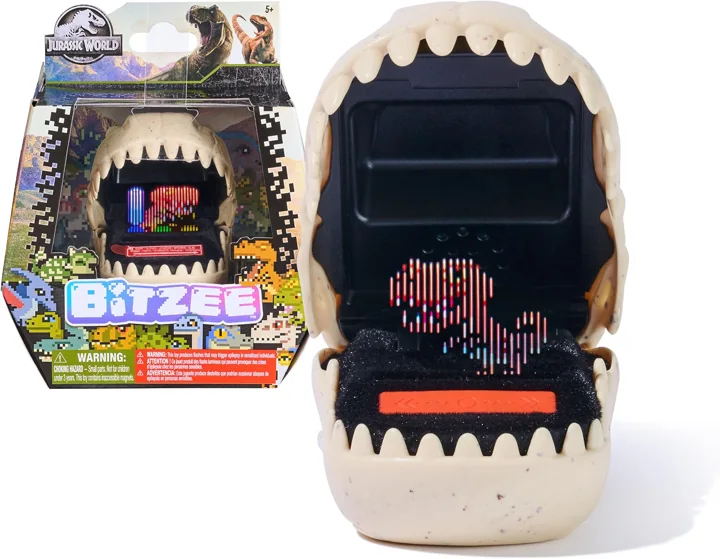
According to Spin Master's product listing, the package contains one Bitzee Jurassic World pod, one Quick Start Guide and one Instruction Sheet. The toy includes three AA batteries. Keep the instruction paperwork and packaging model details; the illustrations matter when locating a touch surface or menu symbol.
Thinking about Bitzee Jurassic World?
Compare the listing with the 5+ age recommendation and confirm that it is the Jurassic World dinosaur pod, not another Bitzee edition.
🦖 Explore Bitzee Jurassic World on Amazon ↗Affiliate link. As an Amazon Associate, we earn from qualifying purchases. Check the exact model, seller, price and availability.Getting started: A first-session checklist
- Check the contents and battery setup. Locate the included manual and follow its battery instructions. Do not remove or replace batteries with sharp metal tools.
- Exit Try-Me mode. The Jurassic World instruction sheet says to swipe across the swipe bar once from left to right. This is specific to this model; do not borrow another Bitzee's activation sequence.
- Follow the built-in tutorial. Practice gentle touch from above, shake, left/right tilt, a quick lift and swiping the bar as prompted. The tutorial introduces feeding and hatching.
- Learn the two important touch areas. Swipe across the lower swipe bar for navigation, and gently touch the flexible display from above when prompted. Never poke, grab or pull the flexible display.
- Start the care-and-collect loop. Meet your dinosaur's needs, explore for fossils, create eggs and hatch new dinosaurs as the game allows.
The official video demonstrates Try-Me exit at approximately 1:06 and the tutorial at 1:17. If packaging or an updated instruction sheet differs, use the documentation supplied with your exact pod.
Bitzee Jurassic World Quick Controls
These actions are drawn from the Jurassic World manual, not from Aquarium, Doghouse or Hamster Ball controls:
| Action | What to do |
|---|---|
| Exit Try-Me mode | Swipe left to right once across the swipe bar. |
| Open the main menu | While with a dinosaur, swipe the bar to access the main menu. |
| Choose a menu icon | Gently touch the flexible display from above to select. |
| Choose a dinosaur | Open Compound, swipe through dinosaurs and touch to select. |
| Start an Expedition | Open Expeditions; swipe through unlocked environments and touch an area to visit it. |
| Use the DNA Replicator | Open DNA Replicator, swipe through collected fossils, touch to choose them, then shake the pod. |
| Feed a dinosaur | Open Feed and gently touch the display when prompted. |
Touch the display gently from above only. The manufacturer explicitly warns not to poke or pull the flexible element. For the original diagrams, consult the Spin Master manual filed with the FCC.
How to collect fossils and use the DNA Replicator
The new-dinosaur sequence has three separate parts: find a fossil, make an egg, then hatch it. A collected fossil is not already a new character.
1. Go on an Expedition
From the main menu, touch Expeditions. Swipe through environments you've unlocked and tap the area you want to explore. Tap repeatedly during the digging interaction to uncover a fossil. Your fossils are stored for the DNA Replicator, so you don't have to treat each dig as a newly hatched dinosaur.
2. Turn fossils into an egg
Open DNA Replicator. Swipe through the fossils you've collected, touch the ones you want to place into the machine and shake the pod to extract DNA. The Replicator then produces a dinosaur egg. If you have Amber from a battle, the toy may offer to add it for a rare-colored result.
3. Hatch the egg
Watch for the egg-ready notification and tap repeatedly as shown. The manual says you may need to choose which dinosaur to release if you hatch one already represented in your compound. That means collecting a fossil, producing an egg and adding a dinosaur are separate milestones; don't assume every fossil automatically adds a new creature.
If Expeditions show only a few areas, that is consistent with progression: the manual says winning solo battles unlocks new environments for digging and battling. It does not provide a single universal timer or fossil count for every new egg.
How to hatch and grow dinosaurs
Newly hatched dinosaurs begin as babies. Care and interaction increase a dinosaur's companionship, helping it grow into an adult. Adult dinosaurs can enter mini-games and battles, so the everyday care phase is part of progression rather than a separate activity to skip.
When the toy signals a need, follow the on-screen prompt. The manual shows gently touching the display to feed, swiping the bar to clean up poop, and swiping for medicine when a dinosaur is sick. These are digital care actions: do not put real food, water or medicine into the pod.
Spin Master cautions that repeatedly ignoring a dinosaur's needs can cause it to run away, requiring you to find, hatch and grow it again. No reliable universal evolution timer is published in the referenced instructions, so look for the in-game prompts and companionship progress rather than a guaranteed number of minutes.
How battles and the six mini-games work
Once a dinosaur is an adult, the Games and Arena options become relevant. The manual names six mini-games: T-Rex Maze, Rock Bash, Jungle Run, Water Breach, Catch n' Chomp and Fly & Dodge. Winning games boosts battle stats, including defence, attack and speed.
For a solo fight, open Arena, choose an unlocked environment and your dinosaur, then enter the battle. The official quick-start sheet explains the three actions as a simple counter system:
- Defend beats Quick Attack.
- Heavy Attack beats Defend.
- Quick Attack beats Heavy Attack.
The fight ends when a health bar is depleted. Victories can unlock more expedition environments, and winning awards Amber. Add Amber when the DNA Replicator offers it to seek rare-colored dinosaurs. The manufacturer does not promise every battle will yield a particular rare dinosaur.
Different mini-games have different swipe-bar timings. For example, Rock Bash uses the bar to swing a tail, while Jungle Run uses left and right controls for ducking and jumping. Start with the game's on-screen directions and the official mini-game demonstration at 10:32 instead of assuming one set of gestures works everywhere.
How to connect two Bitzee Jurassic World pods
Both toys must be compatible Bitzee Jurassic World pods. The documented wireless feature is not a promise that Jurassic World connects to Hamster Ball, Aquarium or other Bitzee product families.
- On each Jurassic World pod, swipe into the main menu and touch the Connect icon.
- Make sure both pods are searching nearby. The manual identifies this as necessary to establish a connection.
- Once connected, choose a supported activity. For a two-player battle, select the battle icon, then swipe and touch to select a dinosaur. The game chooses a battle environment.
- For trading, swipe to choose the dinosaur you want to send and carefully check the confirmation screen. Touch the right checkmark on the swipe bar to confirm or the left X to cancel.
Important: Trades are permanent. Confirm the dinosaur and the other player's agreement before accepting. Trading is not a temporary loan or an easily undone swap. If the pods won't connect, check that both are in their Connect search mode and nearby; use the manual and manufacturer support for persistent problems instead of experimenting with resets.
Another Jurassic World pod for two-player play?
Battles and permanent dinosaur trades require two compatible Jurassic World pods. Check the exact model and make sure both players understand the trade rules.
🦕 See Bitzee Jurassic World on Amazon ↗Affiliate link. As an Amazon Associate, we earn from qualifying purchases. Check the exact model, seller, price and availability.The 25 dinosaurs and rare variants
Spin Master advertises 25 collectible dinosaurs, with examples including T. rex, Triceratops and Velociraptor. The published instructions also reference dinosaur types across different environments, but they should not be mistaken for an independently verified 25-slot unlock checklist.
Special colours come from the Amber system: winning battles earns Amber, which can be added to fossils in the DNA Replicator to create rare-colored dinosaurs. The guide does not assume specific drop odds or guaranteed amber results, and it does not invent a complete rare-dinosaur ranking.
To make progress efficiently, alternate between caring for babies until adulthood, playing games to improve battle stats, winning Arena battles to unlock environments, and exploring those new environments for fossils. That is the progression loop described in Spin Master's instructions.
Troubleshooting: When something isn't working
The tutorial or input doesn't seem to respond
First check whether the pod is still in Try-Me mode. Use the documented left-to-right swipe once, then follow the on-screen tutorial. For normal interactions, use gentle touch from above and the swipe bar as instructed; avoid forcing the flexible display. Spin Master's troubleshooting video chapter begins around 14:04.
No new eggs or fossils are appearing
Check whether you've completed the excavation and actually selected fossils in the DNA Replicator. Some Expedition areas unlock after Arena victories. An egg is only created after the Replicator step, and the egg still has to hatch. Avoid inventing a hidden button combination to speed the process.
Two pods won't connect
Put both compatible Jurassic World pods into the Connect menu so both are searching. Try again with the toys nearby; if that still fails, refer to the manufacturer's connection diagrams or contact support with the model information.
Low power or unexpected shutdown
An adult should check the three-AA battery installation using the instruction sheet. Spin Master advises turning the pod off or closing it before replacing batteries, because progress may be lost. Do not remove batteries with sharp metal tools. Do not use factory reset as a routine fix: the documented factory-reset action erases existing play history.
Safety: Spin Master warns that flashing light effects can trigger seizures in sensitive individuals. Use the toy in a well-lit room, and keep the flashing display away from eyes. The product also contains inaccessible magnets; if the toy is damaged or magnets are exposed, stop use and follow manufacturer guidance.
Frequently asked questions
How do you start Bitzee Jurassic World?
Check the three-AA power setup, swipe from left to right once on the swipe bar to exit Try-Me mode, then follow the built-in tutorial. Use gentle touch from above when the toy asks for a screen interaction.
How do you exit Try-Me mode?
For this Jurassic World model, the official quick-start guide says to swipe once left to right across the swipe bar. Do not substitute a switch or dome-hold instruction from another Bitzee model.
How do you hatch dinosaur eggs?
Collect fossils during Expeditions, place them into the DNA Replicator and shake the pod to make an egg. When the egg-ready notification appears, tap repeatedly to hatch it.
How do you use the DNA Replicator?
Choose DNA Replicator from the main menu, swipe through stored fossils, touch the fossils to add them and shake to extract DNA. You may be offered Amber for a rare-coloured dinosaur if you have earned some.
How many dinosaurs can you collect?
Spin Master's Jurassic World product listing advertises 25 collectible dinosaurs. New environments and fossils become available as you progress through the game's care and battle activities.
How do you connect two Bitzee Jurassic World toys?
On both pods, choose the Connect icon from the main menu and ensure each is searching. Once they connect, choose the documented battle or trade activity.
Can you trade dinosaurs between two pods?
Yes. Choose the trade option, select the dinosaur, and confirm with the swipe bar's right checkmark or cancel with the left X. Trades are permanent, so double-check before confirming.
Why aren't new dinosaur eggs appearing?
Digging up fossils alone does not hatch an egg; you also need to use the DNA Replicator and then hatch the resulting egg. Winning Arena battles opens new expedition environments. The manufacturer does not publish a universal egg timer.
Does Bitzee Jurassic World come with batteries?
Yes. Spin Master lists three included AA batteries. Follow the provided battery instructions for replacements and close or power down the pod first to protect progress.
Sources and editorial note
- Spin Master — Bitzee Jurassic World product information (age, character count, battery type and features).
- Spin Master — official Bitzee Jurassic World demonstration video (setup, gameplay and troubleshooting chapters).
- Spin Master Jurassic World instruction sheet, filed with the FCC (model-specific controls, trading, safety and progression). A transcribed manufacturer-sheet reference is also available.
Interactive Pet Guide is independent and is not affiliated with Spin Master or Jurassic World. This guide summarizes manufacturer instructions; it is not a claim of hands-on product testing. Game menus and instructions can vary by production revision, so the paper sheet included with your toy takes priority.