Just unboxed furReal Snuggles the Smiling Sloth? This interactive plush from Just Play can grin, giggle, respond to touch and movement, pretend to drink and settle down for a snooze. The most important first step is to switch Snuggles out of its limited TRY ME store-demonstration mode.
This independent guide combines the published product directions with an outside toy demonstration. Use the video below to see the reactions, then follow the setup, sensor, batteries and troubleshooting guidance here. We have not personally tested this toy.
Watch Snuggles the Smiling Sloth in Action
Watch this Snuggles video demonstration to see the toy's interactive reactions. Select Play to load the video from YouTube.
Select Play to watch the demonstration. YouTube loads only when you choose to play the video, and its privacy policy applies. Watch directly on YouTube if playback is unavailable.
Snuggles the Smiling Sloth at a Glance
| Manufacturer | Just Play (furReal) |
|---|---|
| Age | 4+ years |
| Reactions | 50+ sound-and-motion combinations |
| Size | About 10.25 inches seated |
| Inputs | Proximity, belly touch, mouth feeding sensor and movement |
| Power | 4 AA batteries; demo batteries supplied |
| Included accessory | Pretend juice pouch |
| Before play | Change underside switch from TRY ME to ON |
What comes with furReal Snuggles?
Just Play lists one Snuggles interactive plush and one pretend juice pouch. The toy uses four AA batteries, with batteries supplied for in-store demonstration. Keep any instructions from the packaging, especially the switch and battery markings, because those apply to your exact unit.
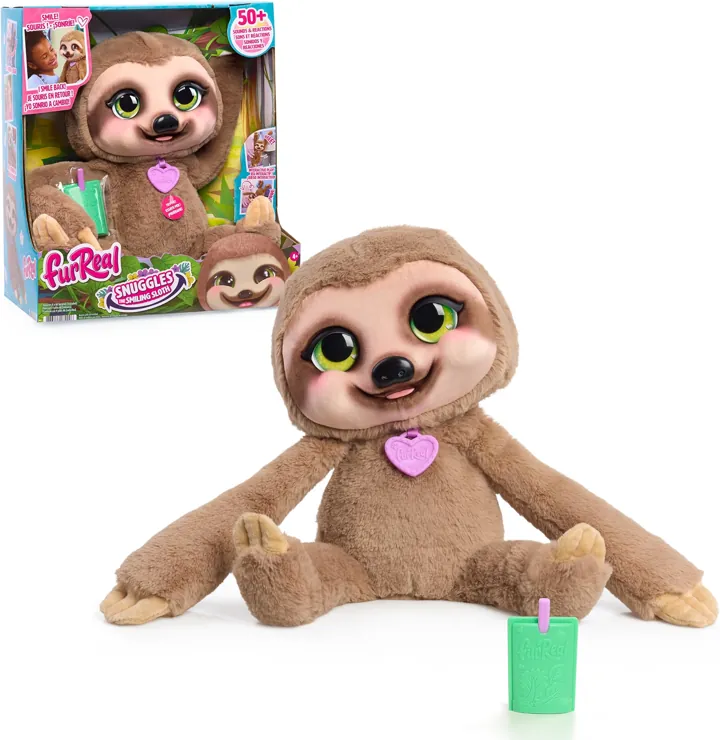
The pouch is a pretend feeding accessory, not a container for real juice. Keep actual liquids and food away from the toy's electronics and plush mechanisms.
Is Snuggles the right interactive plush?
Compare the included juice pouch and age guidance against the product listing before purchasing.
🦥 See Snuggles the Smiling Sloth on AmazonAmazon affiliate link. Check the exact Snuggles model, current seller, age guidance and listing.How to Turn On Snuggles: First-Time Checklist
Important: Snuggles ships in TRY ME mode. Move the switch on the underside to ON for full interactive play. This is the first thing to check if a new toy seems to repeat only a few demonstrations.
- Carefully remove Snuggles and the juice pouch from the box. Keep the packaging instructions.
- Find the power/mode switch on the bottom of the plush.
- Slide it from TRY ME to ON. TRY ME is for limited store demonstrations; ON enables normal play.
- Place the sloth somewhere safe and approach the nose/face area to explore a proximity response.
- Gently tickle its belly, then try the pretend juice pouch at its mouth.
- When playtime ends, switch to OFF to help preserve battery life.
If moving the switch does not produce the expected reactions, check the batteries and the packaging guidance before assuming the toy has a fault. There is no manufacturer-confirmed secret startup combination.
Snuggles Quick Controls
These are interaction areas described by Just Play and independent toy reviewer TTPM. Reactions vary; do not expect identical sounds after every touch.
| Interaction | How to try it | What to expect |
|---|---|---|
| Face proximity | Move closer to or farther from the nose area | Greeting and smiling response |
| Belly tickle | Gently rub or touch the belly | Giggles and facial movement |
| Pretend feeding | Offer the supplied pouch at the mouth as shown on the packaging | Happy drinking sounds |
| Gentle movement | Use the demonstrated supported swinging play gently, with room around the toy | Playful sound reactions |
| Rest | Leave Snuggles inactive | Eventually dozes and snores |
| Wake | Gently touch the plush | Wakes and may smile |
How Do You Make Snuggles Smile?
Just Play describes Snuggles as smiling back when children smile at it. The important detail is that this is a sensor-driven reaction, not camera-based smile recognition. TTPM's hands-on description identifies a proximity sensor near the nose that responds when someone moves closer or farther away. The plush does not need to inspect or recognize the shape of a child's smile to react.
To try the smile response, switch to ON and move into the nose/face sensor's nearby space. Watch Snuggles' cheeks and mouth move into a bigger grin. If nothing happens, change your distance gently and try again rather than covering the nose area or shaking the toy. The manufacturer's marketing describes the experience as smiling together; that is a playful description of the reaction, not evidence of facial recognition or AI.
Tickles and movement-based play
The belly sensor reacts to gentle touch or rubbing, encouraging giggles and smiling expressions. Just Play also describes sound responses when Snuggles is gently swung. Make sure there is clear space, support the plush carefully and avoid rough pulling or swinging near people or hard furniture.
The advertised 50+ combinations are a mix of sounds and motions, not 50 different games or voice commands. A child can experiment with the same gentle interaction more than once and observe different expressions.
How Do You Feed Snuggles?
Use the included pretend juice pouch. TTPM identifies a sensor in the mouth area that detects when the pouch is presented and removed. With Snuggles in ON mode, gently offer the pouch at the mouth as shown in the product demonstration and pause to hear the drinking sounds. Do not force it inside the plush.
If feeding seems unresponsive, check that you have the supplied accessory, the switch is ON, and the pouch is at the mouth sensor rather than the belly or nose. The feature is make-believe: never use real juice, water or food.
How Does Snuggles Fall Asleep and Wake Up?
Just Play says an idle Snuggles will eventually fall asleep and snore softly. You can wake it with a touch, when it may greet you with a broad smile. The manufacturer does not provide a precise sleep timer in the product information reviewed, so don't expect it to snooze after an exact number of minutes.
Sleeping is not the same as being switched OFF. If the sloth does not wake when touched, first confirm ON mode; then consider whether the demo batteries need replacement. Repeatedly trying a reaction when the switch is OFF won't wake the toy.
Thinking of giving Snuggles as a gift?
Take a closer look at furReal Snuggles, its interactive features and the included juice pouch.
💚 Explore Snuggles on AmazonAmazon affiliate link. Check the exact Snuggles model, current seller, age guidance and listing.What Batteries Does Snuggles Use?
TTPM and retail specifications identify four AA batteries, provided for the TRY ME demonstration. They may need replacing sooner than a fresh set intended for normal play. If sounds become faint or the cheeks move less consistently, have an adult check battery condition and replace batteries if needed.
Follow the battery-compartment instructions and polarity markings supplied with the product. Don't mix old and new batteries, allow children to handle loose batteries unsupervised, or open the toy's facial mechanism. Switch the toy OFF when it is being stored.
Snuggles Not Working? Check These First
Start with the TRY ME / ON / OFF switch. Limited store-demo responses are normal in TRY ME mode and do not, by themselves, mean the toy is broken. Then identify the particular response that is missing.
| What you notice | Safe first check |
|---|---|
| Only a few reactions | Move the underside switch from TRY ME to ON. |
| No power or sound | Check ON and have an adult inspect the four AA batteries and polarity. |
| Not smiling | Move closer to or away from the nose area; avoid blocking it. |
| No belly giggles | Try gentle contact on the belly, not just the head or paws. |
| Juice pouch does nothing | Use the supplied pouch at the mouth area; never add real liquid. |
| Appears asleep | Touch gently to wake, then confirm the switch is ON. |
| Sounds unusually quiet | Ask an adult to check the demonstration batteries. |
| Cheeks barely move | Try an appropriate sensor response, then check power; do not force the face. |
If a normal ON-mode toy still fails after checking the manufacturer-recommended setup and batteries, contact Just Play customer support with the model and proof of purchase. Do not disassemble electronics or attempt an undocumented reset.
Frequently Asked Questions
How do you turn on Snuggles the Smiling Sloth?
Move the switch on the underside from TRY ME to ON. TRY ME activates only limited demonstration features.
Why does Snuggles only do a few things?
It may still be in TRY ME mode. Switch to ON to access full play before troubleshooting the battery or sensors.
How do you make Snuggles smile?
Move into the nose-area proximity sensor's range and let it respond. You can also gently tickle the belly to trigger expressions.
Does Snuggles actually recognize your face or smile?
No facial-recognition capability is documented. The published behavior is explained by a nose-area proximity sensor, not a camera evaluating a facial expression.
How do you feed Snuggles?
Offer the included pretend juice pouch to the mouth sensor and listen for drinking sounds. Never use real liquids or food.
How do you wake Snuggles up?
Gently touch it after it goes idle. If it remains silent, check that its switch is ON and the batteries have power.
What batteries does Snuggles use?
Four AA batteries. Included cells are intended for the in-store demonstration and may need replacement during ordinary play.
What should you do if Snuggles stops responding?
Confirm ON mode, check the correct sensor for the activity and have an adult check batteries. Contact Just Play if the normal functions still fail.
Sources and editorial note
- furReal / Just Play product description — TRY ME / ON / OFF, reactions, age, size and supplied accessory.
- TTPM independent demonstration — nose, mouth and belly sensors; four AA demo batteries and cheek movement.
- The Toy Insider's 2026 Just Play coverage — launch-era feature overview.
- Supplied Snuggles video demonstration — video link; uploader not independently confirmed as Just Play.
Research checked November 18, 2026. Interactive Pet Guide is independent and not affiliated with Just Play or furReal. The guide summarizes manufacturer information and independent demonstrations, not personal product testing. As an Amazon Associate, we earn from qualifying purchases.