Just unboxed pink emotoBOT COR-A? This expressive robot from Just Play reacts to touch and sound, displays animated faces and moves its arms and body. This guide explains the first steps, head-sensor menu, activities, accessories and charging so you can begin without guessing.
Start with Just Play’s official setup video and follow the written steps below. This is an independent, manufacturer-researched guide, not a hands-on test. The controls here are for pink COR-A; do not assume every detail applies to purple LEX-C or a later revision.
Watch Just Play's Official emotoBOT Setup Video
Just Play’s initial-setup demonstration introduces COR-A and the main menu. Watch it alongside the printed information that came with your robot, pausing to try each gesture.
The preview uses a locally hosted product photograph, not a video frame. Playing loads YouTube, which may process cookies or device information; see our cookie policy. If playback fails, watch the official video on YouTube.
emotoBOT COR-A at a Glance
| Age | 6 years and up |
|---|---|
| Model | Pink COR-A |
| Face | 2-inch animated LED screen; 20+ expressions |
| Play | 100+ advertised ways to play, feel and connect — not 100 separate games |
| Controls | Touch sensors and sound-responsive play |
| Power | Rechargeable internal battery; USB-C cable not included |
| Connection | No Wi-Fi, Bluetooth or cloud AI required |
| Accessories | Kitty-ear headphones, pretend phone and drink |
Curious about pink COR-A?
Compare the pictured model and included accessories before choosing a seller.
💗 See emotoBOT COR-A on AmazonAmazon affiliate link. Check the exact COR-A model, age guidance, seller and current listing.What comes with emotoBOT COR-A?
Just Play lists one pink COR-A robot, kitty-ear headphones, a pretend drink and a pretend cell phone. The headphones and other accessories are physical play pieces, not separate digital games or an extra robot. You can play with COR-A alone; purple LEX-C is a separate purchase.
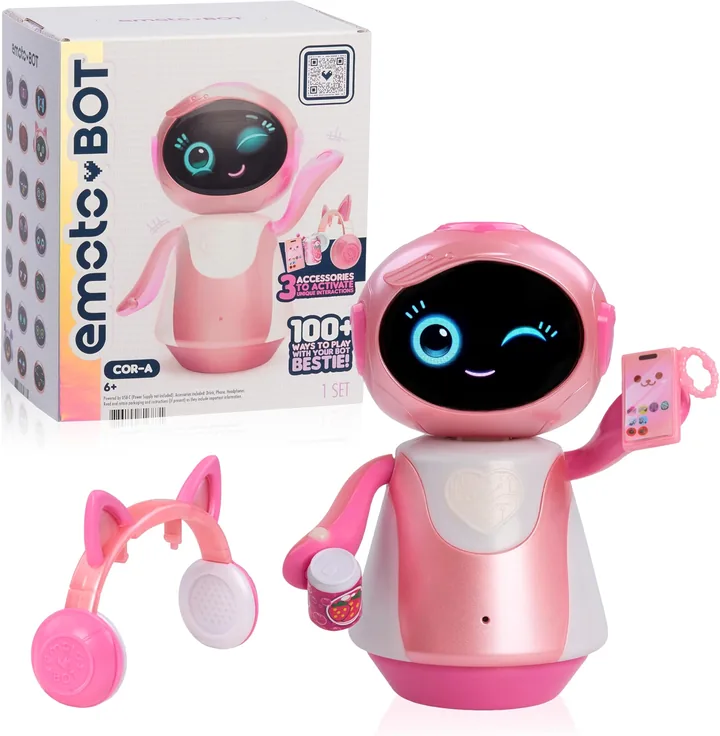
COR-A contains a rechargeable battery, but a USB-C charging cable is not included. Before discarding packaging, keep the product instructions and check that all three accessories are present.
Getting started: A first-session checklist
- Check the model and accessories. Confirm the packaging says COR-A, not LEX-C, and find the headphones, phone and drink.
- Prepare the battery. If the robot needs power, use an appropriate USB-C cable following its included charging guidance. Do not assume a charging adapter is included.
- Start with the official setup video. Follow the steps for activating the toy shown there or on the included instructions; avoid guessing a hidden power or reset sequence.
- Locate the sensors. Get familiar with the head sensor, the front heart area and the sensor on the back before trying combinations.
- Open the main menu. Press and hold the head sensor for about two seconds, then tap that sensor to browse the activities.
- Try one activity. Start with a game, a reaction or music and dancing. Once a child recognizes the menu response, introduce accessories and more modes.
Some actions produce faces, movement or sound rather than spoken confirmation. Pause between inputs and observe COR-A’s LED face; rapid taps can make it hard to tell which action caused a reaction.
emotoBOT Quick Controls
These are the manufacturer-described gestures for COR-A. The head-sensor menu is distinct from the heart-and-back virtual hug.
| Action | What to do |
|---|---|
| Open main menu | Press and hold the head sensor for approximately two seconds. |
| Browse activities | Tap the head sensor to move through activity choices; follow the on-screen prompts for the selected activity. |
| Give a virtual hug | Touch the front heart sensor and the back sensor together. |
| Unlock more games | Play an available game to make progress toward unlocking additional games; specific thresholds are not published. |
| Change accessory-based reactions | Try the included headphones, pretend phone or drink to explore their supported interactions. |
If a menu choice does not start as expected, follow Just Play’s step-by-step videos for the exact selection prompts rather than repeatedly holding unrelated sensors.
How do emotoBOT's games, dancing and activities work?
Just Play advertises 100+ ways to play, feel and connect. That number includes expressive reactions and activities; it is not a claim that COR-A contains 100 distinct mini-games. The manufacturer says playing games can unlock further games, but it does not publish a universal, numbered unlock chart.
Games and progression
Open the menu with the head hold, browse activity choices by tapping, and follow the on-screen instructions for a game. When you finish, look for new available choices rather than assuming a particular number of wins is required. Play can change over time as more activities open.
Music, dancing and jokes
COR-A can dance to its own playlist or a song you play. It also offers jokes, playful sound responses and customizable reactions. These are interactive routines, not evidence that the toy connects to a streaming service or searches online for answers.
Spa Mode, timer and calmer activities
The advertised Spa Mode includes breathing exercises and yoga-style play, and Just Play also describes white noise and a timer with alarm. These are built-in play features; they should not be presented as medical or therapeutic functions.
For a child learning the menu, start with one familiar routine and only then explore other categories. Use the official how-to library if an icon’s action is unclear.
What do the emotoBOT accessories do?
Kitty-ear headphones: Just Play says these give COR-A a kitty-inspired “Pet-itude,” changing some expressions and reactions. The headphones are interactive accessories, not a wireless audio headset.
Pretend phone: It activates make-believe calls, messages and selfies. These are in-toy pretend interactions, not an actual cellular phone or online messaging function.
Pretend drink: Just Play advertises it among the accessories that unlock reactions and playful modes. The manufacturer does not publicly detail every resulting animation, so an exact drink-response sequence should not be assumed.
Place or use the accessories as demonstrated in the official videos; don’t force a piece into the robot if it does not fit easily. If an accessory seems unrecognized, first make sure you have the matching COR-A accessory and try the official demonstration again.
How do you charge emotoBOT COR-A?
COR-A has a built-in rechargeable battery. Just Play specifies USB-C charging and says the cable is not included. Use an appropriate cable and follow the supplied product instructions for the charging port and indicators; public product information does not establish one universal charge time or LED signal.
An adult should supervise charging, keep the connector dry, and avoid forcing or modifying the port. If COR-A fails to respond after charging, use the manufacturer's official troubleshooting video before attempting any undocumented reset.
Can two emotoBOTs interact?
Yes. COR-A can be enjoyed alone, but Just Play also advertises BOT Friends Forever interactions between compatible emotoBOT robots. These may include synchronized dances and playful reactions. Purple LEX-C is another model, purchased separately; Just Play also describes swapping compatible kitty and puppy headsets.
Unlike a phone accessory, these robots do not require a Wi-Fi network, Bluetooth pairing or cloud AI to play. Use the official how-to collection to follow the model-specific two-robot interaction steps. Do not try a generic Bluetooth pairing process.
Thinking of adding COR-A to the toy shelf?
This is the pink model with kitty-ear headphones. Check the listing carefully so you do not accidentally order the purple LEX-C edition.
🤖 Explore emotoBOT COR-A on AmazonAmazon affiliate link. Check the exact COR-A model, age guidance, seller and current listing.When emotoBOT isn't responding
Start by identifying which response is missing: power, touch, sound, a specific menu activity, accessories or two-robot play. Different symptoms do not necessarily have the same fix.
- Will not turn on: Check the rechargeable battery and included setup instructions. If necessary, charge it using an appropriate USB-C cable. Do not open the robot's casing.
- Head or heart sensor not responding: Try the documented head hold, then a single tap. For a virtual hug, touch heart and back together, not the screen alone.
- Sounds inconsistent: Make sure you're using a sound-responsive activity, and try again in a quieter space. Do not assume every sound causes the same action.
- Games still appear locked: Play an already available game. The manufacturer describes progress unlocking more activities, but does not establish a public fixed number of wins.
- Accessories or another robot not reacting: Confirm the correct accessories, models and activity, then follow the official demonstrations. A second emotoBOT is sold separately.
- Charging still fails: Consult the packaging and Just Play support rather than attempting a battery repair or undocumented factory reset.
Just Play provides a two-minute troubleshooting video and official COR-A product information. If the toy appears defective, use the retailer's or manufacturer’s support channel.
Frequently Asked Questions
How do I turn on emotoBOT COR-A?
Prepare the rechargeable battery and follow Just Play's official setup video and the included instructions for first-time activation. To open its main menu, hold the head sensor for about two seconds; this menu gesture is not a substitute for undocumented power-switch steps.
How do I open and navigate the emotoBOT menu?
Press and hold the head sensor for about two seconds, then tap the head sensor to scroll through activity choices. Follow the prompt shown for the chosen activity.
How do I play games and unlock more?
Open the menu, find an available game and follow its displayed prompts. Just Play confirms that playing games unlocks additional games, but does not specify a universal threshold for every unlock.
What do the kitty headphones do?
They give pink COR-A a kitty-inspired “Pet-itude” that changes its play reactions. They are an interactive costume accessory, not Bluetooth headphones.
Does emotoBOT need Wi-Fi, Bluetooth or AI?
No. Just Play describes COR-A as an offline toy that does not need Wi-Fi, Bluetooth or cloud-based AI to play.
Can COR-A interact with LEX-C?
Just Play advertises BOT Friends Forever play between compatible emotoBOTs, including the pink and purple models. Each robot is sold separately; follow the official instructions for the interaction rather than phone-style Bluetooth pairing.
How do I charge emotoBOT?
Use USB-C charging for its built-in rechargeable battery. A USB-C cable is not included. Consult the supplied instructions for the port, safe charging procedure and indicators.
How many games does COR-A have?
Just Play advertises 100+ ways to play, feel and connect, including games, reactions, dancing, calm activities and accessory modes. That does not mean 100 standalone games, and an exact complete game count is not published in the source information used here.
What if emotoBOT stops responding?
Identify whether the issue involves power, a sensor, sound, an accessory or menu progression. Follow the manufacturer's troubleshooting demonstration; avoid unauthorized resets or repairs.
Sources and editorial note
- Just Play — COR-A official product page (age, accessories, sensor functions, rechargeability and offline play).
- Just Play — official emotoBOT website (expressions and product overview).
- Just Play — how-to video library (initial setup and troubleshooting).
- Just Play — official initial setup video (head-sensor menu and starting play).
- Just Play — troubleshooting video (official support orientation).
Interactive Pet Guide is independent and not affiliated with Just Play. This article summarizes public manufacturer information and does not claim first-hand product testing. Included paperwork for your exact model takes priority where revisions or instructions differ. As an Amazon Associate, we earn from qualifying purchases.